Setup Microsoft Teams Alerts
Wormly can integrate with Microsoft Teams to send alerts and failure notifications. For example, your DevOps team chat - or other stakeholders - can be informed when failures are detected on your website, application or cloud infrastructure.
To set this up, first add the integration in your Microsoft Teams settings:
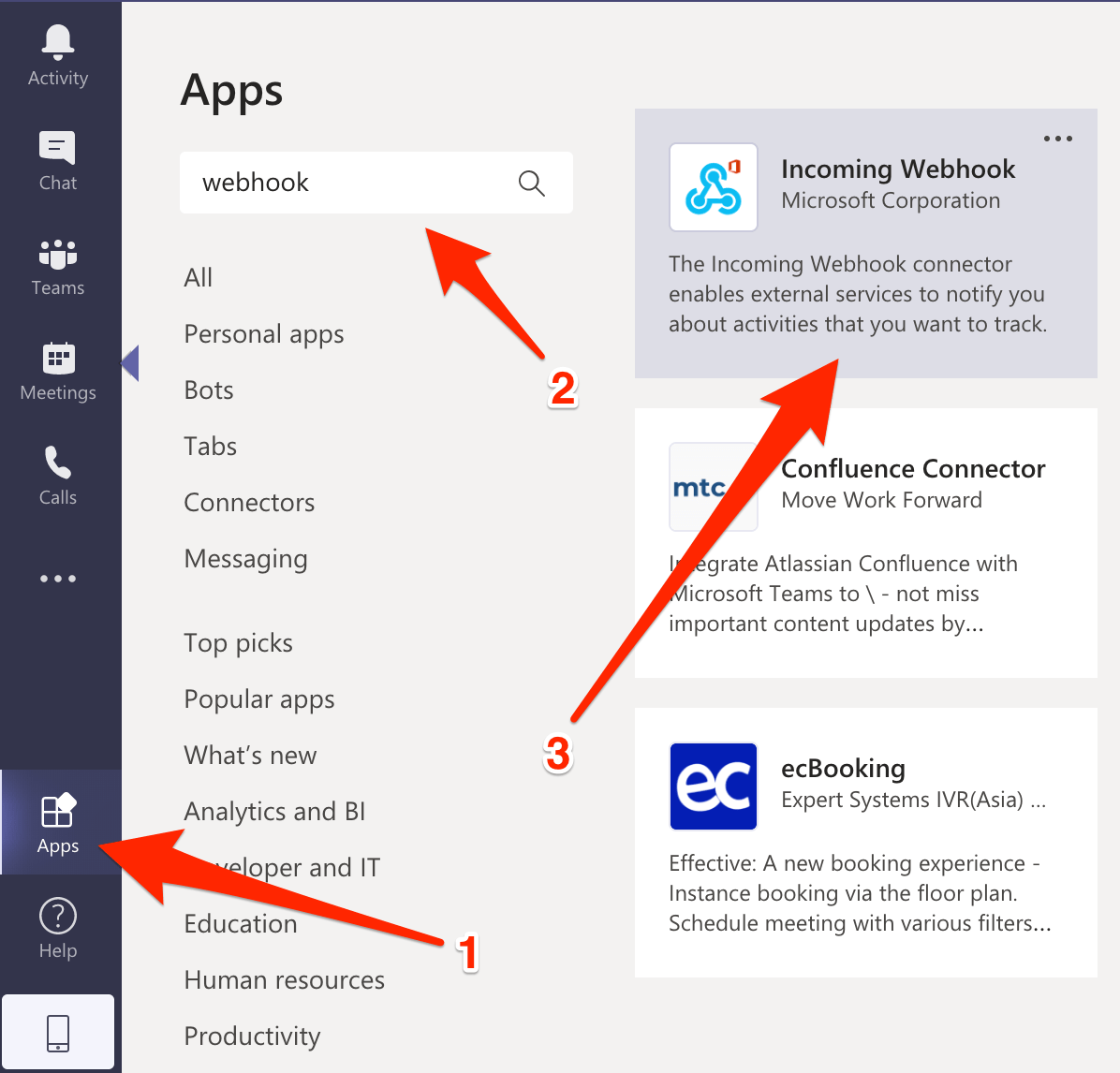
- Click on the Apps icon in the sidebar
- Then type "webhook" in the search input
- Select the Incoming Webhook official app provided by Microsoft:
You will now be prompted to choose a team of channel name to which the alerts will be sent:

Provide a name for the integration; e.g. Wormly Alerts. You can optionally upload our avatar, too:


Now, click the clipboard icon to copy the Teams webhook URL, and then click Done:

In Wormly, head to Contacts and tap Create New Contact - or add a new channel to an existing contact.
Choose the Webhook alert channel:

Then paste in the URL you copied and select the "Microsoft Teams" Webhook Type:

Hit the Send Test button to check that it's working, then Save and you can proceed to configuring your Alert Groups.